Showing posts with label computers. Show all posts

Monday, July 14, 2008

Truly Persistent QuickLook

I love the QuickLook feature in Apple's OS X Leopard (10.5.x). It's a great way to just see what's in a file without having to wait and first launch whichever app is associated with that particular file type. It's also great if someone sends you an Office document and you happen not to have Office (or iWork) on your machine. For instance, as long as there aren't lots of equations or important macros in a file, you can often view the contents of the document better with QuickLook than in, say, TextEdit, for Word files. And if it's an Excel or PowerPoint file, QuickLook may be your only option.

But there's one limitation of QuickLook that's been driving me crazy. As soon as you switch away from Finder (to another application), which is to say, as soon as Finder loses focus, the QuickLook window disappears. What I wanted was truly persistent QuickLook. There are a couple of hits on Google if you enter "persistent QuickLook" - but they only tell you to use Cmd+Y.... And that suffers from the same limitation as using the space bar to invoke QuickLook — at least, as near as I can tell.

Practically, this means that you can't view the Word (or Excel or Powerpoint) document while you type text into another program. Which is irritating, and, as far as I was concerned, rendered QuickLook very nearly useless — or at least, pretty much broken. I wanted QuickLook on the left, and TextEdit (or OmniOutliner or Pages, etc.) on the right, so I could transcribe the one to the other. I found myself frequently PDF'ing the source file so I could actually keep it up for reference while I worked.

Fortunately, there is a way to make the QuickLook window not disappear on you. You can invoke QuickLook from the command line, using qlmanage (man qlmanage for details). Irritatingly (though perhaps arguably correct behavior), qlmanage doesn't exit until the QuickLook window it summons has been closed — but we can get around that with a little dancing and a call to nohup. Here's how I do it:
nohup qlmanage -p "/path/to/file" > /dev/null 2>&1 &

This will bring up a QuickLook preview of the specified file, return you your prompt immediately, and suppress all of the output typically generated by nohup (both the "Appending output to nohup.out" message and the actual output that is typically appended).

Of course, you don't really want to have to open Terminal and type in that string every time you want a persistent QuickLook of a file. Neither do I. Automator comes to the rescue, and gives you the rest of the solution.

In Automator, make a new Workflow for which "Get Selected Finder Items" is the first step and "Run Shell Script" the second. In "Run Shell Script", change "Pass Input" from "as stdin" to "as arguments." Then, delete the template text Automator helpfully provides you with in the "Run Shell Script" box and replace it with:
nohup qlmanage -p "$@" > /dev/null 2>&1 &

Then select "Save As Plug-in..." from the File menu. Automator, again helpfully, offers to build you a Plug-in for Finder — which is exactly what you want. Name it something descriptive (I called mine "Persistent QuickLook" and click Save.

Now, open a Finder window, right-click on something, select "More..."->"Automator"->"Persistent QuickLook" (or whatever you named it), wait a couple of seconds, and — voilĂ ! you have a QuickLook preview of whatever you clicked that doesn't go away. That's a bit more work than merely hitting the space bar (and it takes a bit of time to open, which is a pity), but at least the QuickLook window won't disappear when Finder loses focus.

Wednesday, March 5, 2008

Replacing the Old Jalopy

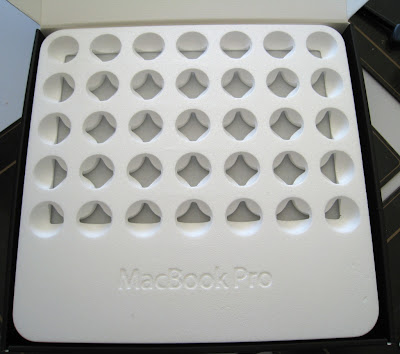
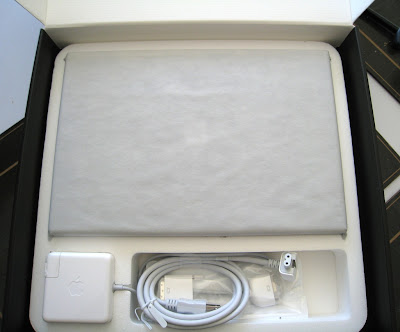
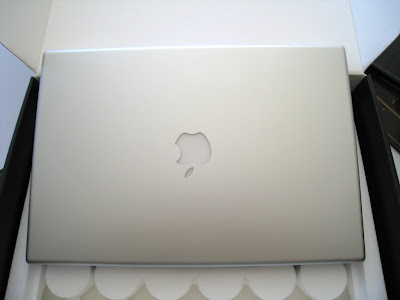
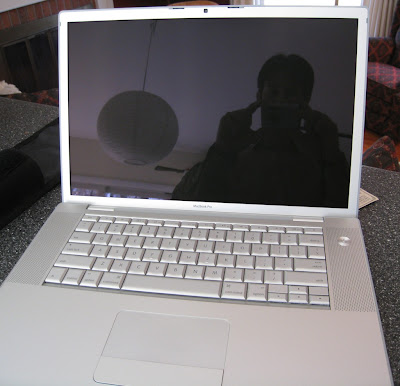
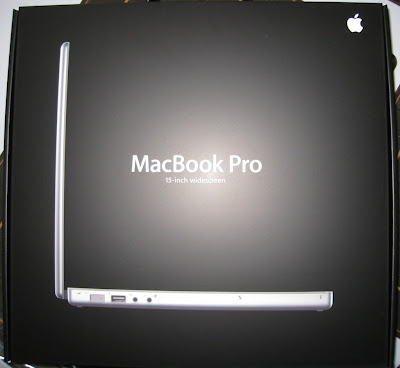
At last, I've replaced my Hackintosh - which in many ways is exactly like an old jalopy - with a shiny new MacBook Pro. All I can say is that it's been well worth the wait. The new machine is fast, quiet, cool, has excellent battery life, and a breathtaking screen. Here are some pictures of the "unpacking ceremony" I shot with David's camera. The machine arrived on Monday morning.


The box. I didn't notice that the flash was set to fire before I took the picture, or I'd have turned it off. I'm glad I didn't, though - I like the effect. I also like the barreling effect from the small lens at close distance to the subject. Both technical flaws that I think improve the overall effect.


Inside the box. The styrofoam Apple uses to pack the machines looks cool, I think. Too bad there isn't something useful that could be done with it. For the time being, I've saved the box and the shipping carton in case I decide to sell the machine in a year.


Under the styrofoam. It's a bit like peeling an onion - layer after layer. Especially since there was yet another box surrounding the one in the first picture....


The laptop, on top of the box.


And opened, on the bar. I got the glossy screen, after liking the same on David and Tracy's MacBooks. I feared at first, when Tracy bought hers nearly two years ago, that the glare would be horrible.... But it's not, and the color saturation and the deepness of the blacks makes any small glare completely worth it - for me, anyway. My 24" panel has the normal matte finish, so if color precision is required, I'll just hook the laptop up to that, rather than proofing on the built-in display.

That's all for now. I installed Windows XP Home (I've not yet convinced myself it's worth it to buy Professional for $199, since I already had a copy of XP Home) this morning using Boot Camp and will try out VMWare Fusion later today. I will say this, though: the I/O performance of the machine compared to my desktop is staggering. Aperture loads up photos at least twice as fast from the Apple-provided 5400 rpm disk.

Sunday, January 20, 2008

Half-Baked

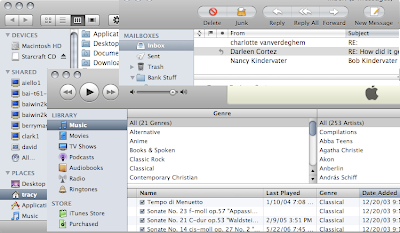
Increasingly, Apple seems to be putting out products that feel incomplete. My previous rant about the MacBook Air serves as an example - a likely forward-thinking idea that's just too early and too unfinished to gain widespread praise. Mac OS X Leopard is another good example. Consider the user interface of Leopard:

This is a composite of screen captures from windows of 3 different Apple-produced applications. The Finder (the background window), Mail (in the upper-right corner), and iTunes. All three applications have a different toolbar (note the extreme difference between Finder and Mail; Finder and iTunes differ mostly in the shape of the toolbar buttons). Mail and iTunes have a different-looking table: note the selected column in iTunes is a matte, bluish color whereas in Mail, it's a transparent, liquid-looking graphite. (Incidentally, though I didn't show it, Finder mimics Mail's table look and feel and not iTunes'.) iTunes and Finder have different scroll bars: the iTunes scroll bar is again a matte bluish whereas in Finder, it's that liquid, transparent graphite again. I could give more examples (like in Finder, you can collapse groups in the sidebar; you can't in iTunes), but you can probably find your own. And it's totally hit or miss as to which look-and-feel you'll get using the machine. Preview share's Mail's toolbar style; Safari shares that of Finder. While in Finder there's a gemstone on the upper-right of the window to hide the toolbar (and the sidebar), in Safari, you have to go through the menus to hide the toolbar.

It's true that Leopard is an improvement over Panther and Tiger - both of which had a dreadful mix of the brushed-metal look and feel and the older, Aqua look and feel developed for the original incarnation of the OS. But still. If Apple was going to clean things up and move back to a unified look and feel, why couldn't they finish the job?

Here's another thing that bugs me. In Tiger (and previously), PPP and VPN connections were handled through a little application called Internet Connect. In Leopard, Internet Connect has been removed and its functions have been integrated into System Preferences' Network preference pane. A good decision (though it took a few minutes to find where they'd moved), since it means that all network connections can be managed from the same place.

But Apple did a half-baked job here, as well. If your VPN connection breaks, or your password is incorrect, the dialog box that is raised shows up with "Internet Connect" in the title and the Internet Connect icon to the left of the error message. Hello? It's almost worse than useless, since it doesn't give the user the correct context to address the problem. The first time I saw it I was completely confused as to why Internet Connect, a no-longer-existent application was raising a dialog box. Then when I read the message, I realized it was merely an example of a lousy job migrating the functionality into System Preferences.

A friend of mine who uses Windows once remarked that you know you've got a really good OS when you start complaining about the UI. I suppose there's something to that. Overall, OS X (Leopard included) is still very solid, very nice piece of software - one to which Windows Vista can't even hold a candle. Nevertheless, I expect more from Apple - namely that they take their time on their releases so they can actually get them right.

Wednesday, January 16, 2008

Miss!

Listen. Hear that? Yeah, that: the whooshing sound. It's the sound of Apple missing. And how appropriate that they named the new machine "MacBook Air."

For $600 more than a MacBook, you can now get a computer with: 1) less processing power, 2) no optical drive (hence no way to install software unless you have another Mac in your house or want to shell out $100 for the external drive), 3) no firewire, one USB, no audio in, and yet-another-different DVI dongle (called micro DVI - mini wasn't small enough), 4) an even slower hard disk than is typically in a laptop - unless you shell out the $999 for the 64GB solid-state disk.

The rationale? It's .4 inches thinner (at its thickest) and 2 lbs lighter. Yay. 'Cause 2 lbs in my bag is actually noticeable.

Don't worry - I've seen all the arguments on both sides. You know, the ones that talk about who the machine is meant for (people who already have a computer and want maximal portability, etc.). I simply reject those arguments. I mean - who cares? Less than half an inch and 2 pounds? For $600? Not to mention the crippled features?

Oh - but it has a multitouch trackpad! Honestly. Who cares? A nice ui touch, but not worth paying for.

The black keyboard is ugly, the bevel surrounding the monitor is still way too fat (similar to the MacBook), the backlit keyboard is a clever gimmick that's been around since the PowerBook 15"....

But here's the biggest miss Apple managed with this machine: no docking station. If you know anyone with an IBM (or even an ultraportable Dell), you've probably seen - and appreciated - the docking station. And Apple left it out - again (or still).

A big miss for Apple at an incomprehensible price.

Wednesday, August 22, 2007

The Right Tool

You might be wondering why I've not posted anything new from the trip to the O RO Ranch in the past couple of days. There are several reasons.

Over the weekend, I bought 4 new doors to replace the same number upstairs in my house. The house came with ugly, unpainted luan doors - just flat, plain, boring doors. The front door, however, is in a colonial-paneled style - much nicer. I replaced the closet door in the living room to match (it's right by the front door - the dissimilarity was jarring) a while back and have planned ever since to do the rest of the doors upstairs. Tracy and I worked on those over the weekend: I cut holes for the door handles while she counter-sunk the hinges for me - with a chisel, since I don't have a router. All well and good; time consuming, but not difficult.

But the frames aren't true anymore: the house has settled since it was built. I planned on that, and bought a sander so I could sand down the doors and make them fit. What I didn't plan on was how much reshaping I'd have to do: the closet door mostly fit - I was able to do that bit of sanding by hand. But some of these doors (or frames, really) need more than a millimeter of adjustment. With the little 1/4 sheet sander I got and 60-grit sandpaper, that doesn't seem to be possible: I've sanded for over an hour on one of the better fitting doors (the door to my room) and it still doesn't fit. I just don't have the right tool.

Fortunately, Tracy's dad is going to loan me a 21-inch belt sander. That ought to do the trick and will be easier to use (for me) than a table saw (which I neither have nor know how to use).

The other reason for the delay stems from my frustration in assembling nice panoramas to post and discuss. I did the Monkeytown panorama by hand, in Photoshop. It looks good, but it was time consuming. Spending that amount of time assembling 2 photos isn't too bad; some of my panoramas have 10 photos. Lining all of those up would take serious time.

Canon has software that'll automate the merger (PhotoStitch). It's easy to use and fast. But it's not terribly good at lining things up. Decent, but not great. And it doesn't let you tweak its merger after (or before) it does its thing. What's more, on my Hackintosh, it fails with an OS error whenever it tries to save anything. Frustrating.

Photoshop offers a more powerful automated merging solution. It lets you do more work tweaking the setup and even tries (and typically fails, in my experience) to figure out in what order and how the photos should line up. Even when it fails to line them up, you can hold its hand and show it how it ought to align the photos. It's harder to use, is very, very slow, but produces better results. Better, but still not great - I can achieve much better doing it by hand (sadly!).

The crux of the problem, though, is this: I want the output as a photo, sure; but what I really want is a QuickTime VR. That's how you really want to look at a panorama - especially those as wide as some of the ones I've taken. But Photoshop won't make them, QuickTime Pro won't let me make them, and the authoring software I demoed I can't make heads or tails of: when I tried to use it, the result was a panorama that was really bad looking, like I'd zoomed way out, or something. Canon's software will make them, but it won't let me import an already-pieced-together panorama for conversion to QuickTime VR (it complains that the aspect ratio is too great - you're limited to 10:1).

Okay, I thought, I'll just chop up the tiff I exported from Photoshop and have the Canon stuff use that. Nope. Even though the images were perfect for merging, PhotoStitch managed to botch it. Can't figure out why, but it did.

Again - I don't seem to have the right tool (or tools).

My current plan is this: manually merge the photos in Photoshop so that I can ensure they're correctly lined up and look as good as possible (I shot them all with a polarizer (a big mistake) so all of them have an annoying luminance gradient I have to deal with). Then, chop them into pieces. At the edge of each of the pieces, I'll attach a large grid or target or something of the sort that should make it dead obvious for the Canon software how the photos fit together. Then I'll use PhotoStitch to export a QuickTime VR. It'll be a pain, but I'm hoping for good results.

And, hopefully, in a couple of days you'll find some high-quality panoramas of the ranch on here to explore.

Tuesday, April 17, 2007

Never Quite the Right Tool

I not only work in a cross-platform environment (though barely); I'm a cross-platform computer user. Not really by choice, mind you: if I ruled the world, we'd all be using Macs (in spite of the great respect I have for Linux). But I don't rule the world and we don't all use Macs and at work I have a PC and not a Mac.

The good thing about this, I suppose, is that it's driven me to discover new and (often) nicer ways of doing things. Well, not nicer, I suppose, 'cause the software I used on the Mac was really, really nice. But better for not only cross platform use, but also multi-computer use. Since my work machine is at work, when I want to work at home, I'd either have to VPN to work and get my files, or mail them ahead before leaving. Or use web-based services and just know that everything's accessible everywhere. Which is what I do.

But the web-based services require a web browser for access. And that means that most of my work is actually being done in my browser, rather than elsewhere. Which makes my browser about the most important tool I use, outside of the work-specific tools I have on my work machine. And that means that I want a really awesome browser.

Here's the problem: my favorite browser in the world, OmniWeb, only runs on a Mac. Moreover, while it's a truly amazing browser (for many reasons too subtle to talk about - you'd have to use it and experience the niceness), and while it passes the ACID2 test, it doesn't support all of the scripting features that Google uses for its services. Sure, the Google services all work in OmniWeb, but you lose the rich-text-like editing capability. Which means you have to type the HTML out by hand. Which is slow and irritating, though not show stopping.

So I use Firefox at work. And now at home, too, often, since it plays so much more nicely with the Google services. And Firefox is a great browser - it even has a better ad blocker than OmniWeb.

It would be really nice if the two could somehow be married. Probably, since Firefox is open source and has such a flexible API, it'd be easier to merge the subtle nice things from OmniWeb into Firefox. But in the meantime, I'm stuck with two tools for the same job, both of which had nice points, and neither of which actually fits quite right.

Thursday, April 12, 2007

Negative Ten Kay?

So I have a Java version of the game Bejeweled on my cell phone. It's entertaining, so I play it whenever I have a handful of minutes of nothing else going on and when I'd rather not be thinking too hard. Searching for matches on a grid of gems is a great way to derail my train(s) of thought. It's especially nice because my phone will suspend the JVM when you close the lid (it's a flip phone), allowing the game to be resumed at a later point.

I've scored pretty high on the game, and with Tracy playing whenever I let her, we've managed to rack up some impressive scores. I got 31k on an untimed game, before running out of moves. She scored some 48k on a timed game that I took over, pushing that score to some 55k before running out of time.

So, having scored some 52k, what do you think I saw when I fired up a fresh game of Bejeweled this morning?

If you guessed -10k, then you're right on! Props for figuring out my weird title.

"Okay, so how in the world did 52k become -10k?" you ask.

Actually, it's pretty simple. The largest number you can store in 16 bits is 65535 - that's 2^16 - 1. If you want negative numbers, you have to halve that, and get 32767. To be precise, in 16 bits, you can store [-32768, 32767]. All well and good.

The trick is, in 2s-complement arithmetic (which is what the adders in modern microprocessors use), if you have the largest positive number and add one to it, instead of the data value saturating, it wraps around. So 32767 + 1 = -32768, not 32768. Convenient at the logic level; horrible in terms of intuitive results.

So what's a programmer to do? Well, you can use a larger integer - say, a 32-bit integer, rather than a 16-bit integer. That raises the maximum signed value from 32767 to some 2 billion: 2147483647. So why didn't they do that? Well, likely the phone doesn't have support for 32-bit integers: it may very well be a 16-bit machine. So instead they should have used unsigned numbers, thus making the max score 65535, and checked for overflow on every addition, saturating the score to 65535. And probably ending the game with a big banner saying: "You win because we were too lazy to emulate 32-bit arithmetic in software on this platform!"

But here's the real gripe. In the game, I saw that my score was topping 50k. Clearly, at that point, they were using the unsigned (non-negative) 16-bit number - the one that would let them store values up to 65535. Now why on earth would they write that number out (or read it back in) as a 16-bit signed number? What kind of moron does that? And what kind of complete idiot writes a game in which it is so easy to score over 35k and doesn't consider whether or not the storage he's allocated for the score is adequate? Obviously the type of moron who's writing cell-phone games for a living.

Ridiculous.

"Type theory. Do you have it? Can I have it? Reward!"

Wednesday, April 11, 2007

Spell Check

Quite a while ago, Tony was working on my computer and got really irritated because, as he was filling out forms on the internet, the computer wasn't checking his spelling. He searched around for a little while and couldn't figure out how to turn it on. Well, this morning, I figured it out and he said he wanted me to write it on his blog. It's nothing exciting, but, since he asked and I like him a lot, I agreed. So, here it is:

This is working on a Mac, of course. Seeing as I don't have a Windows machine in front of me, I can't tell you how or if it works there or not. Right click on a word (for those of you who don't know how to do this with a one-button mouse, hold down your control key while clicking) and you'll see a choice in the list that says "Spelling." Put your cursor over that and a new list will come up. One of the options is "Check Spelling as You Type." Make sure that is clicked and you're good to go.

Tuesday, April 10, 2007

Names Are Like Titles

A good name is everything. Well, alright, not quite everything. But they sure are a lot.

For instance: in digital systems, there is a failure condition known as the Byzantine Generals Problem. (Rather than explaining it in any detail, I'll trust you to look it up on Wikipedia.) It turns out that it is a real problem, it really does happen in real systems, and the consequences of ignoring these types of failures can be quite severe. But it's got the dumbest name. Not because the name doesn't adequately describe the fault scenario - it does. No, because when you try to talk to a manager about it, it's instant confusion. "Wait a minute, here.... Treacherous lieutenants? How can computer components lie? This must be nonsense!" And so on. "Asymmetric faulty" is a much better term (though less cool sounding): it captures the essence of what happens and doesn't require you to imagine that computers are actively trying to be mischevious (or treacherous). I blame L. Lamport for it, since he first described the situation (with others) in this paper.

Here's another one for you. Ribbit. Go ahead. Guess what that is (before clicking on the link!). Give up? It's an add-in to Word and PowerPoint that allows you to enter equations in LaTeX syntax. Imagine trying to get your company to front the money for this tool.
"Hey boss, I'd like you to buy a new tool and suggest that other members in the company give it a try."

"Really? What's it called?"

"Ribbit."

"...."

Yeah. That'd go over real well. And while I'm griping, "LaTeX" isn't such a hot name, either. "Oh - that rubbery stuff?" Yeah. Another Lamport invention, I might add. Oh yeah - and Ribbit's tagline is "Even better than the real thing." Whatever that means.

I should not leave you with the impression that I am the King of Names, however. I'm rotten at coming up with good names - just as I'm rotten at coming up with good titles. But knowing that, I'd for sure get some advice before trying to market my next great product, theoretical contribution, etc. And I understand why people pay so much money for good marketing.

Friday, April 6, 2007

Services, Ownership, and the Rise of an Empire

I recall several years ago - around 2000 - a professor told me of Microsoft's plans to make Office a web service. No longer would people actually buy and install Word, etc.; rather, they would subscribe to an online Office service and edit their documents online.

I scoffed at the idea. No way, I thought, would anyone want that kind of model of software. I based my reasoning on the resultant lack of ownership and also on a profound distrust for Microsoft: with my documents on their servers, what was to prevent them for reading my information? "But," you say, "why would they care about your information?" Not mine, perhaps, but Lockheed Martin's? Dell's? IBM's? You see my point. What's "proprietary" if the company that makes your word processor can read your documents right off their servers?

Of course, as yet, Microsoft has not succeeded in migrating Office to a web service. But Google has introduced something along those lines. And, while our core productivity applications might not yet be services, so much of the rest of our tools are. Like email: GMail, Yahoo!, etc. Like Blogger. Like Picassa. Like Flicker. Like MySpace and Twitter. You get my point. Sure, all of those are free, but they're still web services. And if you'd told me in 2000 that would happen, I'd not have believed you. Proof of my naivety? Perhaps. Or proof of the radical pace of technological and sociological change (in response to the change of technology).

It doesn't bother me, anymore, that I don't "own" my email service or my blogging service. Not sure why, but it doesn't. Perhaps it's the convenience. For some time, I tossed my own photo library in php and MySQL; more and more, I'm thinking of using something like Picasa to share my photos over the 'Net. So much easier than maintaining my own thing, finding my own hosting, etc. Sure, I have the technical skills to do it.... But I'm a bad computer nerd: by the end of each day, the thought of interacting with a computer is rather unappealing. Certainly the thought of doing anything "computer sciency" is unappealing. Designing, implementing, and maintaining a website counts, in my mind.

Something else has happened with the rise of Internet services: the rise of a new (or several new) empires. Just as Microsoft generated synergy for its products by releasing a Microsoft version of everything, Google is building itself an Internet empire based on an ever-increasing collection of services. GMail. Google Documents. Google Analytics. Google AdSense. Google AdWords. Google Calendar. Blogger. Picasa. All the Google search tools. I'm sure I'm missing others.

It's daunting. And they're all free. If I stop and think about it, it's a bit unnerving, this spiraling increase in Google's presence on the web (as if their search engine wasn't enough presence on its own!).

And then there's Apple. Which struggled for so long. With Mac OS X, they gained a superior OS with a vastly superior user experience. They've always had excellent hardware (excepting, perhaps, the early iMacs). And then came the iPod. And iTunes. And iTunes Video with TV shows. And now iTunes Movies. And now the Apple TV. And now the iPhone. The rise of another empire - in multimedia rather than web services - based on the synergy of related products. Sony should ph34r Apple's power - perhaps not yet, but they'd better be looking down the road: I see only Apple dominance there. (Naivety, again?) And no complaints (yet), as Apple's done a better-than-average job of not taking advantage of its placement, just as Google has. Though I'm sure some would disagree, I point out that both are committed to open standards. (Yeah, FairPlay DRM is not open - but Jobs defended that quite well in this essay.)

Now here's a thought: imagine a merger between Apple and Google. Google's technical expertise in Internet services, distributed computing and file storage, ....; Apple's decades of experience in design and user interfaces. Currently, they have (mostly) non-overlapping technologies. Together, well, I foresee the potential for some amazing innovation.

And then we could watch Microsoft run for the hills. That's a nice thought, I must say.